Elitewin7 in Your Pocket
Elitewin7 runs on your phone with Pragmatic Play slots, Evolution live tables and TRON in the cashier. This page covers what loads quickly, what uses the most data and how to get set up in a few taps.

Elitewin7 on Your Phone: What to Expect
How the mobile casino handles games, payments and support on the move
This page covers how Elitewin7 runs on a phone. We built the mobile side for players who care about load times more than flashy animations. You open the lobby, find your game and get playing without waiting through long intro screens.
The game library comes from Evolution, Pragmatic Play, NetEnt and Push Gaming. That matters on mobile, because these studios build their titles in HTML5 and scale them to smaller screens. Gates of Olympus and Starburst both load fast and stay readable in portrait mode. The Evolution live tables need a steadier connection, so if your signal drops, try them on Wi-Fi first.
Payments are short and simple. We accept 11 payment methods: TRON, Visa, Mastercard, Neosurf, MiFinity, Jeton, Bank Transfer, Bitcoin, Ethereum, Litecoin and USDT. For crypto you copy the wallet address, confirm the transfer in your crypto wallet and go back to the game. The minimum deposit is A$20, or A$30 for crypto, before you send anything.
If something goes wrong mid-session, our support team is on Live Chat and Email. You can also reach us at [email protected]. The sections below explain setup, performance and what to check before you install or bookmark the site.
Mobile Site vs App: Which One Suits You
How the two ways to play Elitewin7 differ on data, speed and storage
You can play Elitewin7 in your phone browser or through the app, and both open the same account, balance and game library. The difference is in how each one handles your connection and your storage.
The mobile site needs nothing installed. Open it, log in and you are spinning Gates of Olympus within seconds, which is handy if your phone is already full of photos and maps. The catch is that each visit loads the page fresh, so a weak signal can mean a slower lobby.
The app sits on your home screen and keeps part of the interface on the device. Menus and the lobby tend to open faster on weak data, and you get back into a session with fewer taps. It does take up some storage and needs the odd update.
Live tables from Evolution stream video either way, so a steady connection matters more than the format you pick. Deposits in TRON, live chat and e-mail support work the same on both.
| Feature | Mobile site | App |
|---|---|---|
| Installation | None, opens in the browser | One-time download |
| Phone storage | Only browser cache | Uses device storage |
| Lobby loading on weak signal | Reloads on each visit | Faster, part of the interface is stored |
| Updates | Automatic on the server side | Installed from time to time |
| Game library | Same titles from Pragmatic Play, NetEnt, Push Gaming | Same titles from Pragmatic Play, NetEnt, Push Gaming |
| Live casino | Evolution tables, needs stable data | Evolution tables, needs stable data |
| Payments | TRON, Visa, Mastercard, Neosurf, Bitcoin and more | TRON, Visa, Mastercard, Neosurf, Bitcoin and more |
| Support | Live Chat and Email | Live Chat and Email |
Downloading Elitewin7 on Android
How to get the Elitewin7 casino onto your Android phone and start playing.
Your phone is probably your main screen for casino play, so the Android version has to load fast and leave room on your storage. Elitewin7 runs in a light format that opens the full lobby in one tap. That includes Gates of Olympus, Book of Dead and Starburst, plus Evolution live tables.
You don't need a separate account for mobile. You log in with the same details you use on desktop, and your balance, history and active offers move across with you.
Data matters if your signal drops in and out. Slots from Pragmatic Play and NetEnt cache their graphics after the first load, so the next sessions use less bandwidth. Live dealer streams use the most data, so save those for a stable connection.
Deposits work in the app too. Payments use TRON, Visa, Mastercard, Neosurf, MiFinity, Jeton, Bank Transfer, Bitcoin, Ethereum, Litecoin and USDT, and the minimum deposit is A$20 (A$30 for crypto).
Open the site in Chrome
Go to the Elitewin7 site in your Android browser and open the menu to find the app option.
Add it to your home screen
Tap the install prompt or pick 'Add to Home screen' from the browser menu. You'll get an icon that opens like any other app.
Log in or register
Launch the icon and sign in with your current details, or create an account in a few fields.
Check your settings
Turn on notifications if you want them, then open the cashier to see the TRON deposit details before you play.
Installing Elitewin7 on iOS
Put the casino on your home screen in under a minute, with no App Store download.
Elitewin7 runs on iPhone and iPad through Safari as a web app. You don't wait for a big App Store file to download, and you don't have to clear storage for it. The shortcut sits on your home screen and opens the lobby full screen, the same as a native app.
This matters when your signal drops to one bar. The page loads only what you need, so Gates of Olympus or Book of Dead starts without a heavy bundle loading first. Live tables from Evolution use more data, so connect to Wi-Fi before you sit down at one.
Updates install themselves. Each time you open the shortcut you get the current version, with nothing to patch.
Open Safari
Go to the Elitewin7 site in Safari. Other iOS browsers don't always show the home screen option.
Tap Share
Tap the square icon with the upward arrow at the bottom of the screen.
Add to Home Screen
Scroll the menu, tap Add to Home Screen, and keep the Elitewin7 name or shorten it.
Launch and log in
Tap the new icon, sign in or register, and you are in the lobby. If the icon won't appear, ask Live Chat for help.
Full App Features on Your Phone
What you can do from the Elitewin7 app, and what each part is good for.
The full casino lobby
The same lobby you get on desktop. You can open Gates of Olympus, Book of Dead or Starburst in a couple of taps. Games from Pragmatic Play, NetEnt and Push Gaming load in portrait view, so you don't have to turn the phone sideways to spin.
Live tables from Evolution
The live casino streams Evolution tables straight to your screen. If your signal drops, lower the video quality inside the stream and the game keeps going without starting over.
TRON deposits in the cashier
The cashier offers 11 methods, including TRON for crypto. You copy the wallet address, send it from your crypto app and watch it land. The crypto minimum is A$30 before you send anything.
Support in your pocket
The operator's live chat opens from the menu, so you can ask a question without leaving your game. For anything longer, email the operator through the support section.
Light on data
Short menus and cached pages keep things fast. A weak connection is enough to check your balance, browse the lobby and pick up where you left off.
Account controls
Deposit limits, session reminders and self-exclusion all sit in your profile. You can set them once and change them whenever you need to.
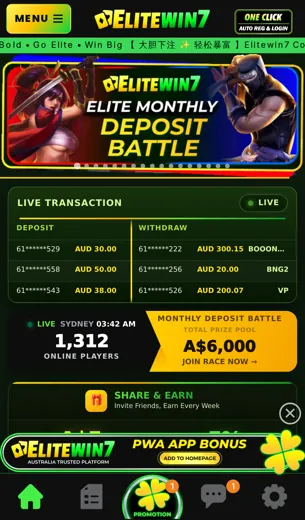
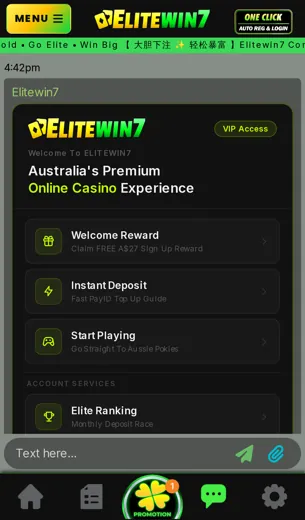
Elitewin7 App Screenshots
Six screens from the mobile app, and what each one does for you.
Before you install anything, it helps to see what you are getting. These screens are from the Elitewin7 app on a phone, with the same layout you get when you sign in.
The lobby loads game tiles first and the extra panels after. On a slow connection that order matters, because you can open Gates of Olympus or Book of Dead before the rest of the page has finished.
The cashier lists TRON, Visa, Mastercard, Neosurf, MiFinity, Jeton, Bank Transfer, Bitcoin, Ethereum, Litecoin and USDT, with deposits from A$20. Live Chat and Email are both a short tap away if a payment looks stuck.
Lobby
Top games sit at the top of the screen, with search and categories just under them.
Slot view
Gates of Olympus by Pragmatic Play in portrait mode, with the spin and bet controls within thumb reach.
Live casino
Evolution tables listed with their bet limits shown before you join.
Cashier
A TRON deposit screen with the wallet address and the amount field on one page.
Promotions
Current offers with their terms, linked straight to registration.
Support
Live Chat opens inside the app, and the Email option sits next to it.
 Casino home screen
 Casino welcome screen
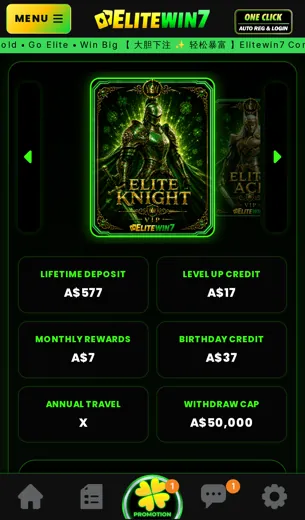 VIP account status page
First deposit bonus on the Elitewin7 app
How the welcome offer works on mobile and what to check before you deposit
Your first deposit on the Elitewin7 app opens the welcome offer. The offer comes from the same account you use on desktop, so you won't find a separate version for phones or a different set of terms.
The welcome offer is a 100% match up to A$1,000, with a minimum deposit of A$20 and 35x wagering. You can see the same figures in the Promotions tab after you register. Read those three lines first. They decide how much of the bonus you can actually turn into withdrawable money.
Deposits go through TRON, which is one of the 11 payment methods in the cashier. The minimum crypto deposit is A$30, and a TRON transfer is a small amount of data, so it still goes through on a weak signal. Wait for the confirmation screen before you close the app.
Once the bonus is credited, the usual choices are Gates of Olympus from Pragmatic Play, Book of Dead and Starburst from NetEnt. Pokies count fully towards the 35x wagering. Live tables from Evolution often count for less.
- Register and log in on the app
- Open Promotions and claim the 100% up to A$2,500 + 100 free spins welcome offer with 35x wagering
- Deposit with TRON and wait for confirmation
- Check that the bonus balance appears before you play

Installing the app doesn't trigger a separate install bonus. The welcome offer is tied to your first deposit, not to the download. If the bonus doesn't show after your TRON deposit confirms, contact the operator through Live Chat or write to [email protected].
Elitewin7 App FAQ
Short answers on safety, payments and playing pokies on your phone.
How can I check if the Elitewin7 app is legit?
Look at the licence details in the legal section at the bottom of the page. Elitewin7 is licensed by the Curaçao Gaming Control Board. Also check that the game providers are real studios, like Evolution and Pragmatic Play.
Is Elitewin7 safe to use on mobile?
The app uses the same account, cashier and verification checks as the desktop site. Use a strong password and only log in on networks you trust.
Is it illegal to play pokies online in Australia?
The Interactive Gambling Act is aimed at operators, not players. ACMA can still block offshore sites, so check your local rules before you sign up.
Which games run well on a slow connection?
Pokies like Starburst and Book of Dead load fast and cope with weak signal. Live tables from Evolution stream video, so they need a steadier connection.
How do I deposit in the app?
Elitewin7 lists 11 payment methods, and TRON is one of the supported cryptocurrencies. Open the cashier, copy the wallet address and send your AUD equivalent in TRX, with a minimum of A$30.
How much can I withdraw?
Withdrawals are capped at A$5,000 per week. Per-transaction limits are A$20 / A$4,000 for cards, A$20 / A$5,000 for e-wallets and A$30 / A$10,000 for crypto.
Will I need to verify my identity?
Possibly. Checks can come up at registration, before some deposits or when you ask for a withdrawal. Have your ID ready to save time.
What is the $20 method in slots?
It's a budgeting habit: you load $20, play until it runs out or doubles, then stop. It won't change the odds, but it keeps your sessions short and your spending under control.
How do I get free play money?
Open the promotions page in the app for current offers. The welcome offer is 100% up to A$2,500 + 100 free spins with 35x wagering and a 30-day bonus validity, and free spins stay valid for 7 days.
Does the app offer live casino?
Yes. Elitewin7 runs casino and live products, with live tables streamed by Evolution.
How do I contact support?
The operator offers Live Chat and Email. For questions about this website, write to [email protected].